


Master Wi-Fi Networking: Routers, Modems & LAN Simplified
Introduction to Wi-Fi Networking Architecture
Wi-Fi networking architecture is the foundation of modern internet connectivity in homes and offices. At its core, it combines hardware, software, and communication protocols to move data between your devices and the global internet. A Wi-Fi router acts as the central hub, intelligently directing traffic between your local devices and your Internet Service Provider (ISP). While the process may seem instant, multiple technologies work together behind the scenes to ensure stable, secure, and high-speed access. Understanding this architecture helps you optimize performance, improve security, and make smarter networking decisions.
Internet Infrastructure and Data Transmission

The internet is a massive global network of interconnected servers, data centers, and fiber-optic cables. Whenever you open a website or stream a video, your request is broken into small data packets that travel across multiple networks before reaching their destination. These packets follow optimized routes determined by networking protocols to ensure fast and reliable delivery. Once the destination server responds, the data returns to your router, which forwards it to your device. This continuous exchange happens in milliseconds, allowing seamless browsing, streaming, gaming, and communication.
👉 You might also like: Senaven: Advanced Platform for Bloggers & Digital Creators
Modem Functionality in ISP Connectivity
A modem serves as the bridge between your home network and your ISP’s infrastructure. Its primary job is to convert digital signals from your router into signals that can travel over cable, DSL, or fiber lines and then convert incoming signals back into digital data. Without a modem, your router cannot access the wider internet. Depending on your connection type, modems use different transmission technologies, but the goal remains the same: establish and maintain a stable link to your service provider. In many setups, the modem and router are combined into one integrated device.
Wireless Router: Core Concepts and Capabilities
A wireless router is more than just a device that “gives Wi-Fi.” It performs multiple critical networking functions simultaneously. It routes data between your local network and the internet, assigns IP addresses to connected devices, and manages wireless communication through radio frequencies. Internally, it contains a processor, memory, and specialized networking components that handle traffic efficiently. Modern routers also include built-in security features like firewalls and encryption protocols. By coordinating wired and wireless connections, the router ensures multiple devices can share a single internet connection smoothly.
WAN Integration and ISP Communication
The Wide Area Network (WAN) port on your router connects directly to your modem, forming the gateway to the internet. Through this interface, the router receives a public IP address from your ISP, enabling communication with external servers. The router then manages outgoing and incoming traffic, ensuring that data reaches the correct device within your network. This WAN integration is essential because it separates internal traffic from external communication. By acting as a controlled gateway, the router enhances both performance and security while maintaining a stable connection to your provider.
LAN Architecture and Internal Network Design
A Local Area Network (LAN) is the internal network your router creates inside your home or office. It connects devices like smartphones, laptops, smart TVs, and printers so they can communicate with each other and share the same internet connection. The router acts as the central controller of this internal system, managing traffic flow and preventing data conflicts. Whether devices connect through Ethernet cables or Wi-Fi signals, they all operate within this structured environment. A well-designed LAN ensures smooth data transfer, reduced congestion, and stable connectivity for every connected device.
Internet Traffic Distribution Mechanism
When multiple devices request internet access at the same time, the router intelligently manages traffic distribution. It receives incoming data packets from the modem and determines which device requested the information. Using routing tables and internal mapping processes, it forwards the correct data to the right destination. At the same time, it organizes outgoing requests to prevent overload. This coordination happens in real time and within milliseconds. Without this traffic management system, networks would experience collisions, delays, and performance drops, especially in environments with high device density.
IP Addressing and Network Identification
Every device connected to a Wi-Fi router needs a unique identifier known as an IP address. This address allows devices to send and receive data correctly within the network. The router assigns internal IP addresses to each device so it can recognize where traffic should be delivered. At the same time, the network uses a public IP address to communicate with the broader internet. This structured addressing system ensures organized communication and prevents data from being misrouted, maintaining efficiency and reliability across both local and global connections.
Public IP Address Allocation
A public IP address is assigned by your Internet Service Provider and represents your entire network on the Internet. All outgoing traffic from your home appears to originate from this single address. It enables websites and servers to send requested data back to your router. Public IPs may be static or dynamic, depending on your ISP plan.
Private IP Address Structure
Private IP addresses are assigned by the router to devices within your local network. These addresses are not visible on the public internet and are used strictly for internal communication. This structure allows multiple devices to operate under one public IP while maintaining unique internal identification for organized data routing.
Network Address Translation (NAT) Mechanism
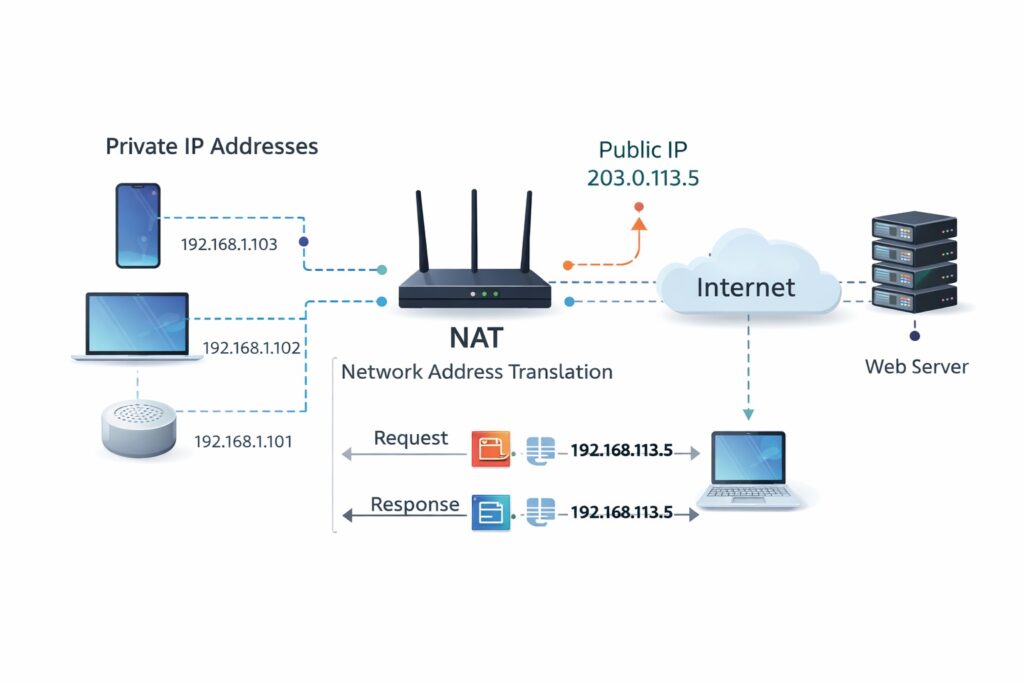
Network Address Translation, commonly known as NAT, allows multiple devices in your home to share a single public IP address. When a device sends a request to the internet, the router temporarily maps its private IP to the public IP. When the response returns, the router translates the address back to the correct internal device. This process not only conserves IP addresses but also adds a layer of security by hiding internal network details. NAT is one of the most critical functions that enables efficient and secure internet sharing.
👉 You might also like: How Dash Cameras Record and Operate in Vehicles Today
Dynamic Host Configuration Protocol (DHCP) Operations
Dynamic Host Configuration Protocol (DHCP) is the automated system that assigns IP addresses to devices when they connect to your network. Instead of manually configuring each device, the router’s DHCP server distributes available addresses from a predefined pool. It also provides essential information such as the default gateway and DNS server details. This automation ensures seamless connectivity whenever a new device joins the network. Without DHCP, network management would become complex and time-consuming, especially in environments with frequent device connections and disconnections.
Wireless Signal Transmission and RF Technology
Wireless routers rely on radio frequency (RF) signals to transfer data wirelessly, eliminating the need for physical cables. Instead of sending electrical signals through wires, the router converts digital data into radio waves that travel through the air. Your device’s wireless adapter receives these signals, converts them back into digital information, and processes the data. This transmission occurs over specific frequency bands designed for wireless communication. The router continuously manages signal strength, channel selection, and interference reduction to maintain stable connectivity. This invisible exchange of radio signals is what enables seamless browsing, streaming, and real-time communication.
2.4 GHz vs 5 GHz Spectrum Analysis
The 2.4 GHz band provides wider coverage and better penetration through walls, making it suitable for larger spaces. However, it is more prone to interference from other household devices. The 5 GHz band offers higher speeds and lower congestion but has a shorter range. Modern routers intelligently balance these bands for optimal performance.
IEEE 802.11 Standards Evolution
Wi-Fi performance is defined by IEEE 802.11 standards, which determine speed, efficiency, and signal reliability. Over time, these standards have evolved to support faster data rates, improved capacity, and better device handling. Newer generations enhance overall network performance while maintaining backward compatibility with older devices.
Wireless Security Protocols (WPA2/WPA3)
Security is a critical function of any Wi-Fi router. Wireless networks are naturally exposed because signals travel through open air, making encryption essential. WPA2 and WPA3 protocols protect data by encrypting communication between the router and connected devices. This prevents unauthorized access and data interception. WPA3 offers stronger encryption methods and improved protection against password-guessing attacks. In addition to encryption, routers include firewall capabilities that monitor incoming and outgoing traffic. Together, these security layers ensure that your personal data, online transactions, and connected devices remain protected.
Performance Optimization and Throughput Factors
Wi-Fi speed depends on more than just your internet plan. Router hardware, frequency bands, signal interference, and the number of connected devices all influence performance. Throughput refers to the actual data transfer rate you experience, while bandwidth represents the maximum capacity available. Features like Quality of Service (QoS) help prioritize critical activities such as video calls or gaming. Proper router placement, firmware updates, and channel optimization can significantly improve real-world performance. By understanding these factors, users can maximize both speed and network stability.
Conclusion
Wi-Fi networking architecture is a structured system where the modem, router, LAN, WAN, IP addressing, NAT, DHCP, and wireless protocols work together to deliver seamless internet access. By understanding how these components interact, users can improve performance, strengthen security, and make smarter decisions when upgrading or troubleshooting their network. A well-optimized Wi-Fi setup ensures stable connectivity, faster speeds, and reliable communication across all connected devices.
Frequently Asked Questions (FAQs)

1. What is the primary function of a Wi-Fi router?
A Wi-Fi router links your internal network to the internet and directs data traffic between connected devices smoothly.
2. How does a modem differ from a router?
A modem establishes the connection with your ISP, whereas a router shares and manages that connection across your devices.
3. Why do devices have private IP addresses?
Private IPs help identify devices inside your local network without exposing them publicly.
4. What does NAT do in a network?
NAT allows multiple devices to share one public IP address securely.
5. How does DHCP help in networking?
DHCP automatically assigns IP addresses and network settings to connected devices.
✨ Got value? Let’s keep the momentum, follow Dympigal